Claude Code under the hood
The concepts I wish I’d known before week one: the agent loop, instruction scopes, context management, skill invocation, hooks, and client permission checks.
Jump to summary
Written by Florian Bruniaux
AI Founding Engineer at Méthode Aristote, 13 years scaling engineering teams from developer to CTO. Builds open-source developer tools, see what else I've shipped.
TL;DR
| What | Details |
|---|---|
| The agent loop | Gather context, act through tools, inspect results, and continue. |
| Instruction scopes | User, project, and path-scoped instructions add context. Auto memory is a separate mechanism. |
| Context budget | Files, messages and tool outputs share the model’s available context. Inspect usage and preserve decisions before clearing. |
| Skill invocation | A skill can be selected by the model or invoked explicitly. Triggering it does not prove a correct result. |
| Runtime controls | Permissions and event-specific hooks can constrain tool calls. Their scope and failure behavior must be verified. |
Technical contracts checked against Claude Code documentation on September 12, 2026. Historical anecdotes below retain their original scope.
When I started with Claude Code, I spent weeks editing configuration files I didn’t understand. I wasn’t careless. I read documentation carefully, borrowed setups from developers I respected, and spent evenings tuning things that didn’t need tuning yet. I was building on vocabulary I was guessing at, and the gap between what I thought Claude Code did and what it actually did was costing me more time than I realized.
At some point I stopped and dismantled the docs. I concentrated on the architectural material: the agent loop, the tool catalog, the memory model, and the execution semantics. Two days of reading that should have been day one. After that, configuration started making sense.
This is the article I wish had existed before those two days. If this is your first stop with Claude Code, Where to Start is the better entry point: it covers the orientation, the recommended sequence, and why the order matters. This one goes deeper, assuming you’ve already gotten past the vocabulary.
The loop is simpler than it looks
Claude Code runs a loop. You submit a prompt, Claude reasons about it, calls some tools if needed, reads the results, and responds. Then the loop repeats.
Tools let Claude inspect files, search, edit and run commands. Their names and availability depend on the client version and configuration. The useful model is the loop itself, rather than an unsourced claim that a fixed set handles a fixed percentage of sessions. Anthropic’s architecture overview describes the tools and context that support it.
That changes what CLAUDE.md is for: persistent instructions that belong alongside the current task and the files Claude reads. A new context window is not proof that no knowledge persists. Claude Code also has auto memory and can resume saved sessions; inspect the active sources rather than assuming either perfect recall or a complete blank slate.
Written instructions have several scopes
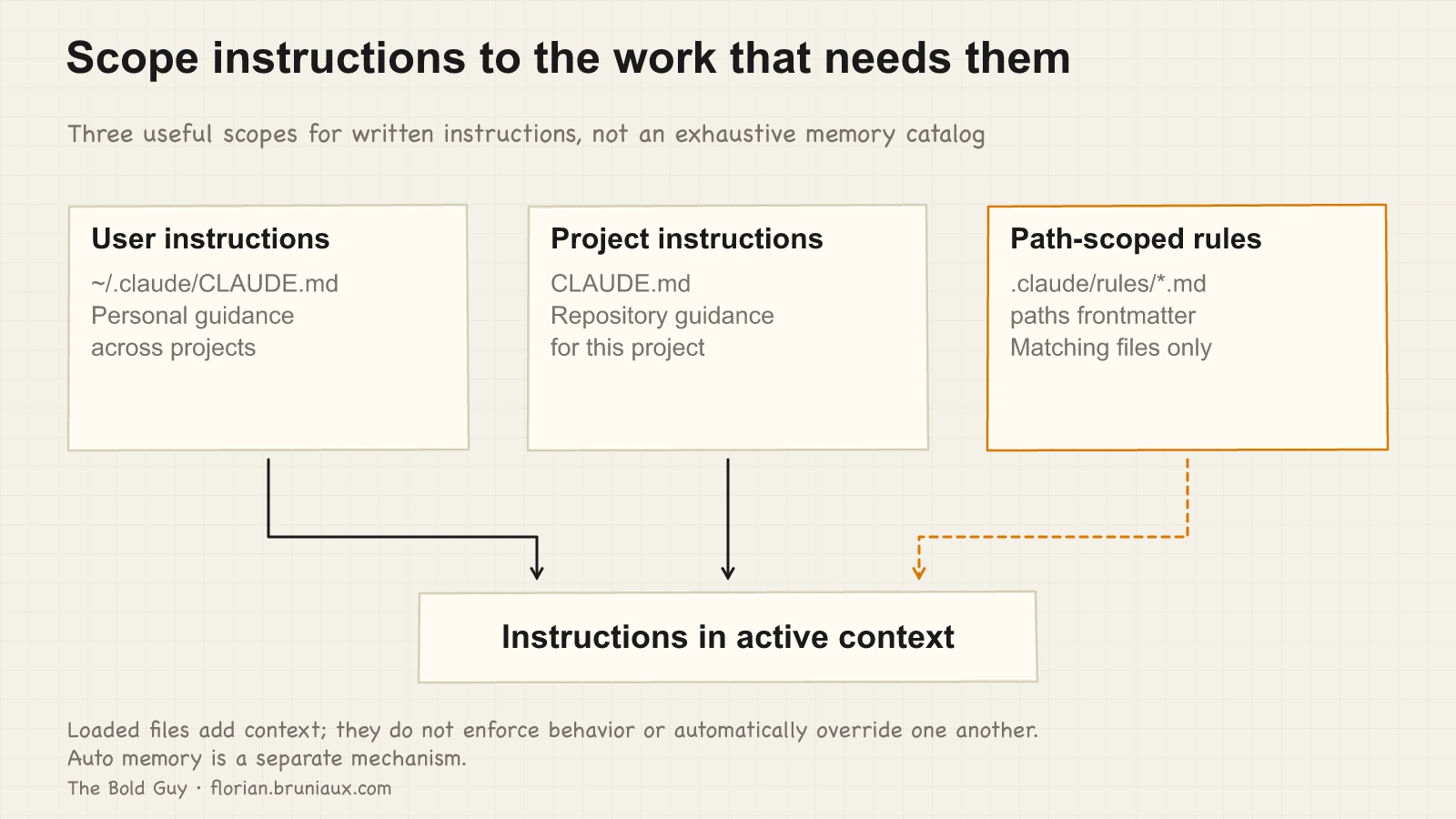
Three scopes are useful when organizing written instructions: user guidance in ~/.claude/CLAUDE.md, project guidance in CLAUDE.md, and conditional rules under .claude/rules/ with paths frontmatter. This is not the complete inventory: managed policy, local files and auto memory also exist.
In my setup, the user file carries communication preferences and workflow conventions. The project file describes the stack, architecture and commands. Rules that only matter for API work should be scoped to matching paths rather than loaded for every task.
Loaded files are concatenated into context. A more specific file does not mechanically override every conflicting instruction. The memory reference documents these scopes and their load conditions. Test behavior separately.
The context window is a budget
Claude Code’s context holds instructions, conversation, file contents and tool results. Capacity depends on the model and configuration. Use /context to inspect usage; the client can compact automatically as the window fills. There is no universal 75% failure threshold established here. Tool output is one source of pressure, which is why I use rtk to reduce verbose command output. The saving depends on the command and what must be retained. See the context-management explanation.
The two tools for managing this are /compact and /clear. Compact replaces earlier conversation detail with a summary, which can omit useful information. Clear resets the active conversation; saved transcripts and persistent instruction or memory files are separate. Write down decisions and remaining work before clearing, then verify what the next session actually restores.
Checkpoints before a /clear work like commits: write the current state, the decisions made, and the remaining tasks to a file. When you start the new session, load the checkpoint and confirm Claude understood it. Check the restored state against the files before continuing; a checkpoint can be incomplete or stale.
The longer a task, the more it needs to be decomposed. A well-decomposed task with several /clear checkpoints produces better results than the same task run as one long conversation that degrades toward the end. Product people tend to pick this up faster than developers, in my experience. They’ve been decomposing requirements into epics and stories for years, and that habit of structuring work into checkpointed steps turns out to be exactly the right mental model for managing a long Claude session.
Skills support automatic or explicit invocation
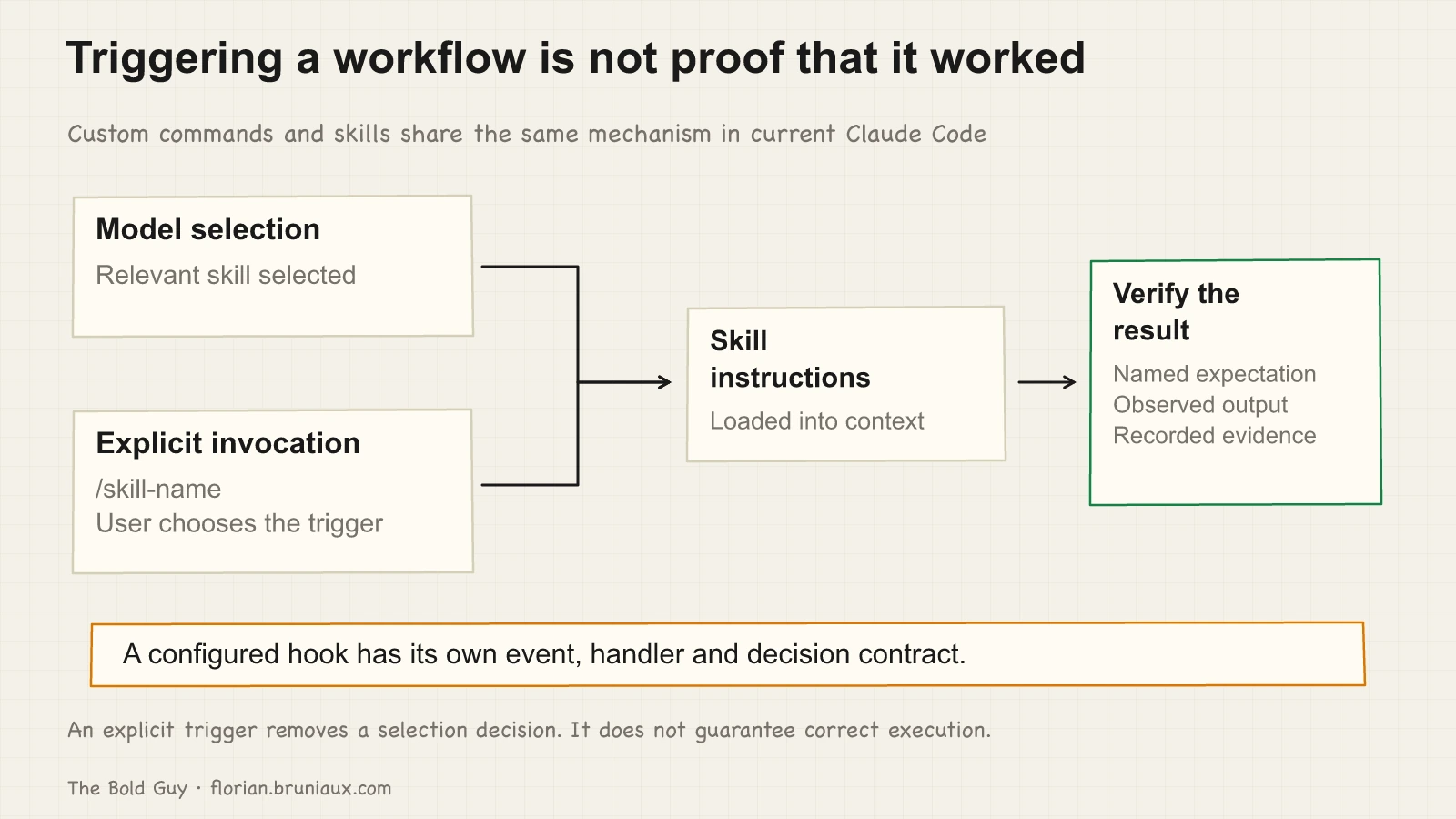
The design choice is who triggers the procedure. A model can select a relevant skill, or you can invoke it with /skill-name. Current Claude Code has merged custom commands into skills; legacy command files still work. There is no supported 70% versus 100% reliability comparison in this article.
For a workflow that should only run when requested, disable-model-invocation: true prevents automatic invocation. That controls selection, not the correctness of the resulting work. A release or deployment still needs its checks and the required authorization. See Anthropic’s skill invocation reference.
Hooks provide event-specific controls
Hooks run configured handlers at supported events. A synchronous PreToolUse handler can deny a pending tool call. A PostToolUse handler runs after the tool has executed successfully; it cannot undo a file write that already happened. Other events expose different decisions. The hook reference defines those contracts.
A useful first case is protecting named files: inspect the proposed write, evaluate the policy and return the host’s supported denial. That requires an active registration, a matching event, correct parsing and a handled result. An arbitrary error or timeout is not a universal blocking guarantee.
Hooks can make a specific policy check explicit. They do not remove the need to test coverage, failure handling and the resulting decision on the client where the policy will run.
Delegation has versioned boundaries
A named subagent has its own prompt, tools and context. It can isolate verbose investigation and return a focused result to the parent. A conversation fork is different: it inherits the parent’s prompt and history.
The current subagent documentation, checked on September 12, 2026, describes a configurable nesting limit, with three layers below the main conversation by default. Older versions used other defaults. “Subagents can never spawn” is therefore not a stable product rule.
Two task patterns remain useful. A team pattern gives different reviewers parts of one problem. A batch pattern gives the same procedure separate scopes. Assign ownership and use worktrees where isolation is required; a separate context window does not by itself isolate filesystem changes.
Observation, resumption and compaction also depend on the client’s capabilities. Do not infer a fixed summary size or complete input isolation for every kind of worker. Start with a bounded case and inspect what actually returns.
Permission modes control tool decisions
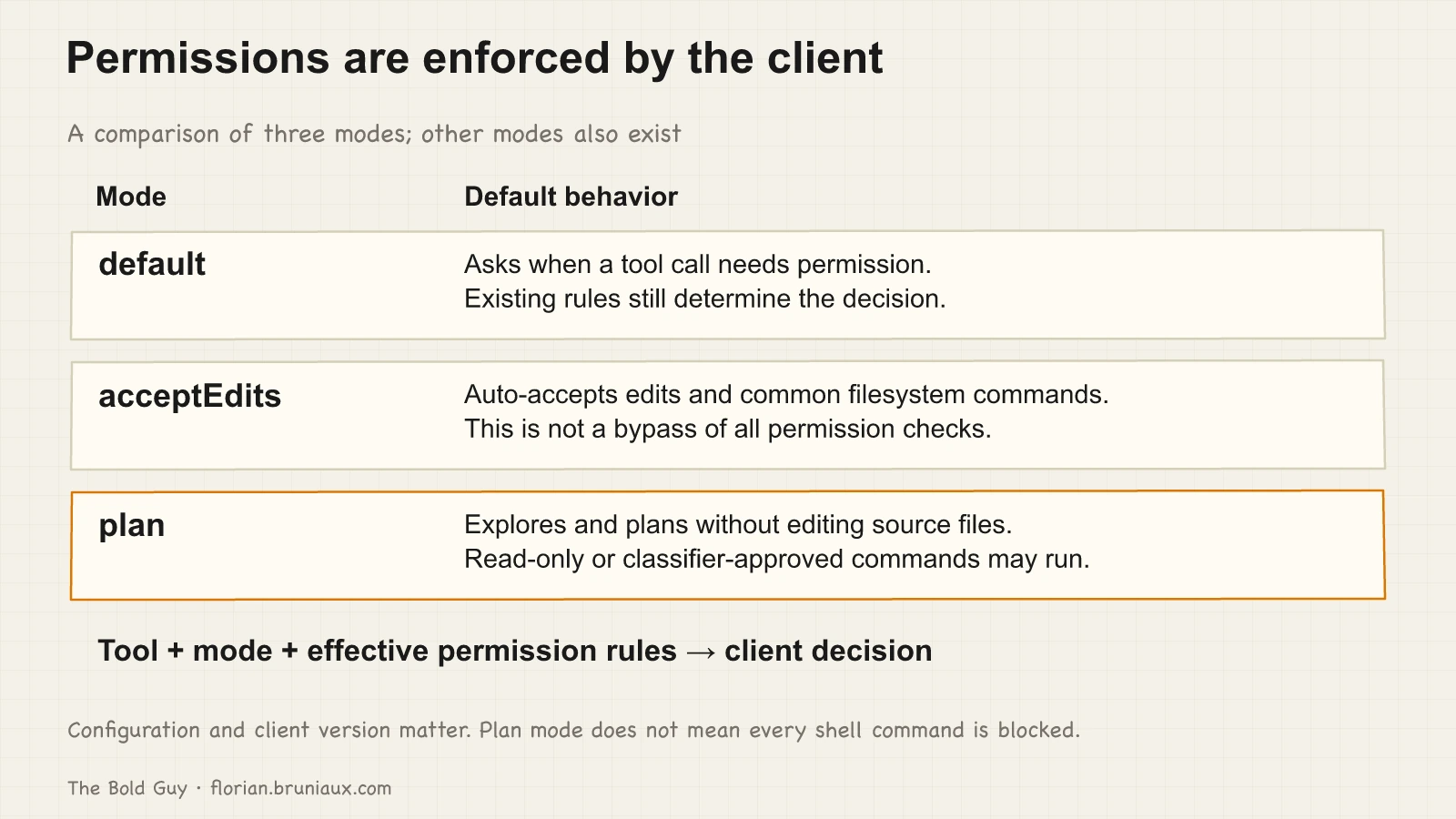
Permission rules are enforced by Claude Code, rather than merely suggested to the model. The permissions reference distinguishes several modes. Three useful examples are default, which asks when a call needs permission; acceptEdits, which accepts edits and common filesystem commands; and plan, which explores without editing source files.
Plan mode can run read-only shell commands and, when the relevant classifier is available, approved commands. It does not mean every Bash call is blocked. Likewise, acceptEdits is not the mode that bypasses all permissions. Check the active mode and effective rules before relying on a boundary.
Three account-level checks
Three things that rarely appear in onboarding material.
Check retention against the account type and privacy preference actually in use. As documented on September 12, 2026, consumer accounts allowing model improvement have a five-year retention period; those that do not have a 30-day period. Commercial defaults and eligible zero-retention arrangements have separate conditions, and local transcript storage is another surface. Enterprise does not automatically mean zero retention or a compliance certification. Use the current data-usage policy and your applicable terms.
If you’re rolling out Claude Code to a team, watch for the API fallback setting. When a user hits their subscription limit, there’s an option to fall back to pay-per-token API automatically. A teammate of mine had this enabled without realizing it. A few days of normal usage generated a 300-400€ bill. Takes 30 seconds to check during rollout. Miss it and you find out from the invoice instead, which is the exact failure I built ccboard to avoid: it surfaces cost, hook health, and MCP status as they move, not a month later.
The third one is a role observation. At some point, if you’re running a non-trivial setup, you’ll find yourself spending a real fraction of your time on the configuration itself, not writing features, not reviewing code, but tuning rules, updating hooks, refining agents when the workflow changes. On my current setup, that’s somewhere between 30 and 50% of commits during active maintenance periods. Treating it as legitimate engineering work, rather than overhead to minimize, changes how you allocate time and who owns it on a team.
Choose the next article by goal
These aren’t the only concepts, but they’re the ones where the gap between the surface-level understanding and the real behavior tends to cause the most friction early on.
For a structured reference rather than a narrative walkthrough, the guide’s architecture deep dive covers the same loop, tool catalog, and memory model in lookup form, useful when you want to check a detail rather than read start to end.
If you’re still figuring out the right order to learn all of this, the onboarding map organizes it by week and links to the resources at each stage. This article assumed you’d already gotten past the vocabulary; that one tells you how to get there.
If you want to see what these mechanics look like in practice on a production codebase over seven months, Claude is my second contributor covers the commit patterns, what Claude handles, and what remains human work.
The mechanics also have a security half. Local hook commands and MCP servers can execute with the permissions of their host process, and the attack surface guide audits that layer directly, with five defense scripts ready to drop into .claude/hooks/.
And once the agent loop stops feeling like magic, Plan-Execute: running 20+ agents on a migration is where the same primitives get pushed to their limit: an Opus planning pass driving two dozen Sonnet agents that rewrite hundreds of files in parallel.
One loop, explicit context, verified controls
Claude Code becomes easier to inspect when the loop, instruction sources, invocation paths and permission checks are kept distinct. Instructions influence behavior. Client controls restrict supported actions. Evidence from the active client tells you which boundary actually held.
One thing I still get wrong occasionally: deciding a task is simple enough to skip Plan Mode and being wrong about that. If you’ve developed a reliable heuristic for that call, I’d be curious to hear it.
YSNK
(You should now know)
- Inspect the tools and context available in your actual client rather than assuming a fixed tool count or context size
- Written instructions, auto memory and resumed sessions preserve different kinds of information
- Explicit skill invocation controls the trigger; it does not guarantee a correct result
- Permissions and hooks have different contracts, and a post-execution hook cannot undo an action retroactively
- Check account-specific retention and billing settings, and verify delegation limits against the client version
Go Further in the Claude Code Guide
Practical resources selected to help you take the next step.
Open-source galaxy
Projects used in this path
Related appearances
Live appearances and podcast episodes about this article.
Related articles
Choose your AI-assisted engineering starting path
Choose between Claude Code and Cowork, then follow the Start, Build, or Scale path that matches your role and current operating problem.
Non-technical to production in 10 days with Cursor AI
A non-developer modified 80 files in production in 10 days with Cursor AI. Exact timeline, AI config setup, and what it means for engineering teams in 2026.
2/2 · Claude selected my output style. Then ignored it
Claude Code selected flow-lean but skipped its footer. A casing fix showed why installation, selection, and behavior need separate evidence.
Go deeper
Step-by-step guides that put this into practice.
Claude Code setup, level by level
Three configuration layers for project context, daily tools and persistent memory, with checks for what loads and how it behaves.
Claude Code security: the attack surface nobody audits
Hooks are shell scripts with your user permissions. MCP servers are third-party code with access to your credentials. Their timing and access depend on the configured events and server.
Context engineering: the L0-to-L5 playbook
Choose context controls from L0 to L5 according to the failure you observe, from project documentation to scoped rules, behavior checks and shared configuration.