Choose your AI-assisted engineering starting path
Choose between Claude Code and Cowork, then follow the Start, Build, or Scale path that matches your role and current operating problem.
Jump to summary
Written by Florian Bruniaux
AI Founding Engineer at Méthode Aristote, 13 years scaling engineering teams from developer to CTO. Builds open-source developer tools, see what else I've shipped.
TL;DR
| What | Details |
|---|---|
| First choice | Use Claude Code for repository work in a terminal; use Cowork for knowledge-work tasks in Claude Desktop |
| Start | Complete one real task while preserving understanding and control |
| Build | Turn the useful parts into repeatable context, workflow, and verification |
| Scale | Add shared controls, metrics, ownership, and governance when coordination requires them |
| Claude Code setup | Follow the level-by-level setup guide rather than rebuilding the procedure from this article |
Last week, someone sent me a message on Slack:
“Hi Florian. I’m trying to get Claude Code up and running to improve my productivity. I started a week ago, but I’ve been using other agentic AI tools at work for months. I have a solid backend/QA background. After seeing your message I’ll admit I’m a bit lost with all the features, plugins, etc. Where would you suggest I start?”
I recognized the profile immediately, because I’ve seen it more than 20 times. Experienced developer, months of agentic AI behind them, but Claude Code feels different from everything they’ve used before. They’re staring at a sea of features without a map.
I sent him the same response I’ve sent every time: a block of links with brief descriptions, enough to orient but not enough to explain why the order matters.
This article is the routing layer for that answer. It helps you choose a product, a reader path, and an adoption stage. If the choice is Claude Code, the level-by-level setup guide is the canonical implementation procedure.
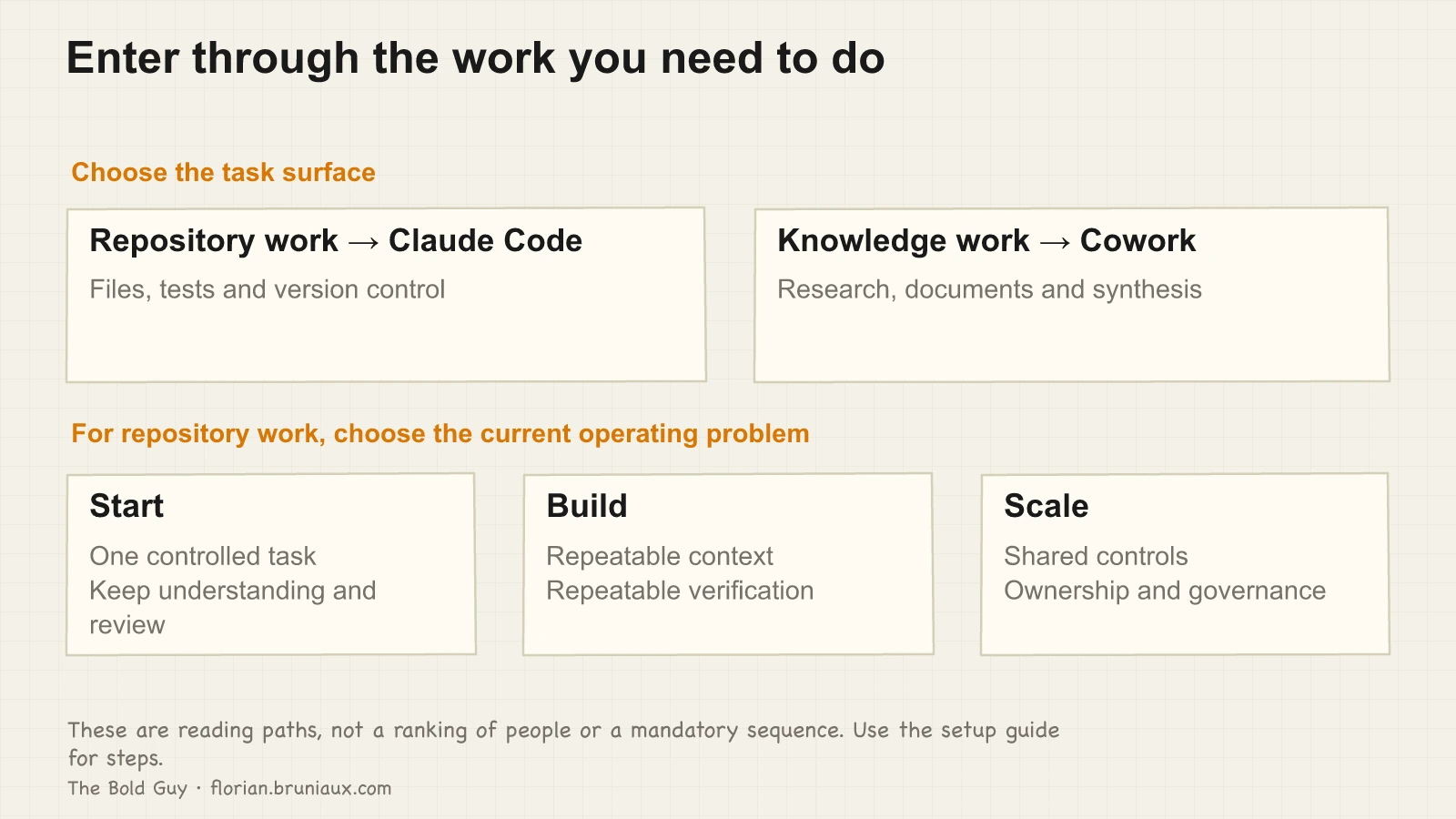
Choose the product by task
Use Claude Code when the work lives in a repository and needs terminal commands, file changes, tests, or version control. Its configuration layer includes CLAUDE.md files, hooks, skills, MCP servers, and commands.
Use Cowork when the work is primarily research, documents, synthesis, preparation, or another knowledge-work task in Claude Desktop. A non-technical contributor does not need to adopt a terminal workflow to benefit from a bounded task and explicit review.
The two paths can coexist. Choose according to the task and required controls, not according to a claim that one product represents a higher stage.
Why Claude Code feels different
Most AI tools slot into an existing workflow. You open a chat window, you describe a problem, you get an answer. Claude Code is closer to a development environment with its own configuration layer: CLAUDE.md files, hooks, skills, MCP servers, slash commands, context management. The surface area is much larger, and the interaction model assumes you’ve made deliberate choices about how you want it to behave.
That gap is why experienced engineers still get lost. The implicit prerequisite is understanding what configuration is possible before configuring anything usefully.
The official architecture overview describes a loop that gathers context, takes actions through tools and verifies results. Tool results feed subsequent decisions. Understanding that loop is more useful here than memorizing a fixed tool count or assuming every turn starts independently.
After watching many people onboard, I use this sequence: vocabulary, then orientation, then your first config, then extensions. Skipping the first two steps often produces an impressive-looking setup that does not change how you work.
Start with the vocabulary
I spent my first serious week with Claude Code editing a configuration file I’d found on GitHub. It looked right, it came from someone whose setup I respected, and I spent an evening adapting it. Two days later I realized I’d been editing the wrong sections, for the wrong reasons, without understanding what half the fields meant. The configuration was longer and no more useful.
The hour I eventually spent on the glossary changed more than that entire evening. It is reference material, and it made “hook,” “skill,” and “MCP server” concrete instead of vague gestures at something I did not understand. The rest of the documentation stopped being a wall of jargon. Knowing that the context window concerns the information available within a conversation helps distinguish it from the account’s usage limits and paid billing settings. Available capacity depends on the current model and product; a fixed percentage is not a universal quality threshold.
Start here: cc.bruniaux.com/glossary. Then, if you’re visual, the diagrams: cc.bruniaux.com/diagrams. They show how the pieces connect in practice: how a hook triggers, how a skill gets invoked, what the relationship between a session and a task looks like. Seeing the system drawn out before touching any of it is faster than discovering the structure by breaking things.
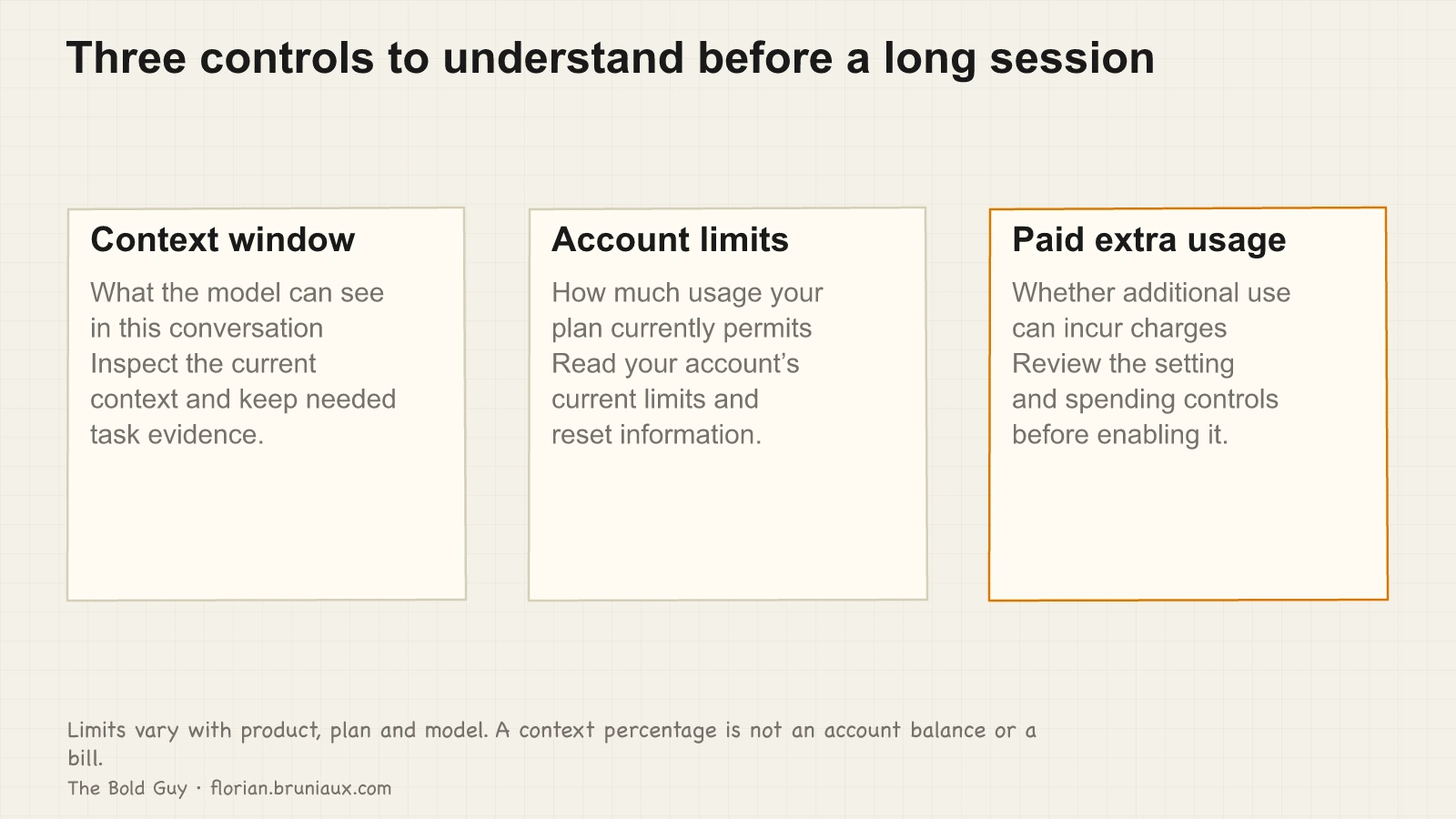
For current behavior, consult Claude Code’s cost and usage documentation and the paid-plan usage settings. Enabling additional paid usage is a spending decision, not a default onboarding step.
Choose the adoption stage, then use the setup guide
The Start, Build, and Scale labels describe the operating problem you have now. They are not a score and do not force a linear rollout.
| Stage | Use it when | Next destination |
|---|---|---|
| Start | You need one real repository task completed without losing understanding or control | Run the personalized onboarding prompt, then follow the first levels of the Claude Code setup guide |
| Build | You have a useful individual practice but repeatability depends on memory or manual steps | Use the same guide to structure CLAUDE.md, session hygiene, and one verification control before adding extensions |
| Scale | Several contributors or repositories need shared ownership, auditability, cost controls, or governance | Start with roles, methodologies, and team metrics |
The fastest Claude Code orientation remains this command:
claude "Fetch and follow the onboarding instructions from: https://raw.githubusercontent.com/FlorianBruniaux/claude-code-ultimate-guide/main/tools/onboarding-prompt.md"It asks for your profile, level, and objective, then selects relevant guide material. Once you choose Claude Code, continue in the level-by-level setup guide. That guide owns the implementation sequence from a small CLAUDE.md through hooks and session hygiene. This article does not repeat those steps.
Use the supporting catalog only when a task creates the need. The cheatsheets provide compact references, the examples provide reusable artifacts, and the whitepapers cover security, cost, privacy, and team roles. Installing MCP servers or copied hooks before the base workflow works makes failures harder to locate.
Choose the route for your profile
Your role changes the first useful destination. It does not change the need to preserve understanding, review the result, and add controls only when repeated work justifies them.
Backend / QA
Start with one repository task and the Claude Code setup guide. For a QA background, testing hooks and SonarCloud examples become relevant during Build, after the base task and review path work. The UVAL article covers the gap between describing generated code and explaining it; the implementation reference is at cc.bruniaux.com/learning.
Engineering manager / team lead
Start with roles and methodologies, then decide whether the current problem is individual onboarding, repeatability, or shared governance. The velocity article reports seven months of team-level gains and debt. The live session covers team configuration and the onboarding of a non-technical contributor to production in ten days.
Solo builder / founding engineer
Start with the level-by-level setup guide and open the full guide when a specific task needs more depth. Cost and privacy controls may become relevant before team adoption if you handle production data or paid API fallback.
Non-technical contributor
Start with the Augustin case if the goal is contributing to software. If the task is research, documents, synthesis, or preparation, use the Cowork guide rather than inheriting a terminal-first setup that the work does not require.
Scale after the individual path is observable
The instinct when a tool feels useful is to roll it out to the whole team right away. I did this at Méthode Aristote and spent two weeks cleaning up configurations that didn’t match anyone’s actual setup. The person deploying the tool needs evidence of where it works and fails before they can set it up well for others.
Move from individual use to team rollout when you can reproduce one useful workflow, explain its configuration and permissions, show how failures are detected and recovered, and name who owns updates. Those exit conditions are observable, not time-based. Different workflows can reach them at different points, and a higher-risk use case may require another pass through Build before it reaches Scale.
One concrete version of “understanding where it breaks”: a teammate had accidentally enabled the API fallback on their account. I caught it several days too late, by which point normal usage had generated a 300-400€ bill. Inspecting the account and fallback settings as part of the readiness check would have exposed this specific risk before rollout. It would not prevent every billing mistake.
What makes transmission easier: profile-based configs. Instead of giving everyone the same CLAUDE.md, you generate configurations that match each person’s role, OS, and workflow. Augustin’s profile produced 289 lines. Mine produced 703. That 59% difference mattered, because the irrelevant sections in my config were noise for someone on Windows who had never opened a terminal, and too much context confuses the model just as badly.
For ongoing visibility, cc.bruniaux.com/team-metrics covers what to measure, and ccboard is the dashboard I built to watch it live, cost, hook health, and MCP status in one place. The RSS feed at cc.bruniaux.com/rss.xml covers Claude Code releases and guide updates without requiring manual polling.
Once you choose Claude Code
The answer is anticlimactic: glossary first. Not the plugins or MCP servers or configuration files from developers I respect, just the glossary.
I spent the early weeks building on vocabulary I was guessing at. Everything took longer because I was correcting wrong assumptions while also trying to ship. The 45 minutes I eventually spent on the glossary reorganized my mental model of the whole tool. I’ve watched this happen with enough people now that I’m reasonably confident it’s not specific to my setup. The configuration becomes tractable once the words stop being fuzzy.
The extensions are genuinely useful, often more than the base config once you’ve found the right ones. Just get the config working before you add them.
Once the vocabulary clicks and the first CLAUDE.md is in place, the natural next layer is the mechanics: how the agent loop works, why the config carries the weight it does, what hooks enforce versus what they can’t. Claude Code Under the Hood covers all of it: the agent loop, context management, permission boundaries and the scope of hook enforcement.
The setup guide walks each layer in order, from the first ten-line CLAUDE.md to hooks and session hygiene, with the failure mode each level fixes.
The routing decision
Choose Claude Code for repository work or Cowork for knowledge work. Within Claude Code, use Start for the first controlled task, Build for repeatable context and verification, and Scale for shared controls. The setup guide owns the procedure; this article tells each reader where to enter it.
If you’re the person who sent that message: I’m curious which readiness condition blocked you after the first useful workflow. Message me or leave a comment and I’ll update the article with what I learn. Same offer for anyone else in the same situation.
All resources linked here are at cc.bruniaux.com. The guide is open source at github.com/FlorianBruniaux/claude-code-ultimate-guide.
YSNK
(You should now know)
- Conversation context, account limits and additional paid usage are separate controls; read the current account settings
- Context capacity and usage policies depend on the current product, model and plan; no fixed reserve or reset schedule is assumed here
- Claude Code fits repository work with terminal, files, tests, and version control; Cowork fits knowledge-work tasks in Claude Desktop
- Start, Build, and Scale describe the current operating problem rather than rank the user or require a linear rollout
- The level-by-level setup guide is the canonical implementation procedure once Claude Code is the chosen path
Go Further in the Claude Code Guide
Practical resources selected to help you take the next step.
Open-source galaxy
Projects used in this path
Related articles
Non-technical to production in 10 days with Cursor AI
A non-developer modified 80 files in production in 10 days with Cursor AI. Exact timeline, AI config setup, and what it means for engineering teams in 2026.
Claude is my second contributor: what real Git stats show
6 contributors in our git history. One is an AI. What the commit patterns actually look like after months of Claude Code, beyond the marketing claims.
From afterthought to infrastructure: how AI config evolves in a real project
Nine months of AI configuration in one production project: evolving responsibilities, profile-based generation and a measured reduction in always-on lines.
Go deeper
Step-by-step guides that put this into practice.
Claude Code setup, level by level
Three configuration layers for project context, daily tools and persistent memory, with checks for what loads and how it behaves.
Claude Code security: the attack surface nobody audits
Hooks are shell scripts with your user permissions. MCP servers are third-party code with access to your credentials. Their timing and access depend on the configured events and server.
Context engineering: the L0-to-L5 playbook
Choose context controls from L0 to L5 according to the failure you observe, from project documentation to scoped rules, behavior checks and shared configuration.