2/2 · Claude selected my output style. Then ignored it
Claude Code selected flow-lean but skipped its footer. A casing fix showed why installation, selection, and behavior need separate evidence.
Jump to summary ↓ Florian Bruniaux
Designing Agent Output · Part 2/2
TL;DR
I recommend installing Flow Lean even though Claude Code now ships a Concise style: Concise is enough for shorter answers, and Flow Lean does more. I put response defaults in an Output Style, repository facts in CLAUDE.md and workflows in skills. I trust a setting only after a fresh-session canary shows the behavior: Claude Code showed my style as selected and ignored it until a casing fix.
| Layer | Put this there |
|---|---|
| Output Style | Default response shape, tone, and formatting for the main Claude Code conversation |
CLAUDE.md | Project identity, conventions, commands, boundaries, and repository context |
| Skill | A reusable workflow loaded when the task matches or the user invokes it |
| Subagent | Its own role, tools, model, prompt, and any skills that must be preloaded |
| Proof | File hashes establish installation; a fresh-session canary establishes observed behavior |
My Claude Code /config screen showed two adjacent settings: Verbose output false and Output style flow-lean. They sound related, but they control different layers.
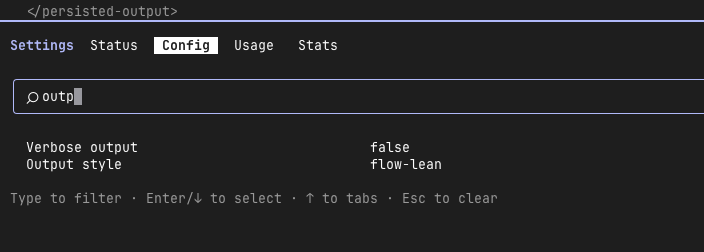
Verbose output changes how much operational detail Claude Code displays. An Output Style changes the instructions in the main conversation’s system prompt.
The second mechanism is what makes a response rule such as “lead with the result” persistent without repeating it in every user message.
Part 1 explains why I built and evaluated Flow Lean as a full skill. This part covers the smaller delivery layer that carries its communication defaults.
Product reference checked October 15, 2026: Anthropic now documents Proactive, Concise, Explanatory and Learning as built-in styles alongside Default. Selecting a style applies on the next message from v2.1.251; editing its file requires a terminal restart. The Claude Code 2.1.266 canary below remains a dated observation. Output Styles reference
Response defaults do not belong in every project file
I originally had three ways to ask for concise output: mention Flow Lean in the prompt, load the complete skill, or place the same rules in global CLAUDE.md. All three work, but they have different costs.
Repeating the instruction spends attention and relies on the user remembering it.
Loading the full skill adds workflow rules for task classification, safety, testing, recaps, attribution, and review depth even when the only required behavior is a shorter answer.
Putting all of that in global CLAUDE.md mixes personal response preferences with project context.
Anthropic’s Output Styles documentation defines a dedicated channel. A custom Markdown file changes the system prompt’s role, tone, or response format.
CLAUDE.md remains the place for codebase context and project conventions. Skills remain task-specific workflows.
Claude Code also provides a built-in Concise style, documented for v2.1.237 and later. It leads with the result and keeps responses short while preserving engineering depth, error reports, security warnings, and destructive-action confirmations.
If you only need shorter answers, the built-in style is enough. I still recommend installing Flow Lean: it does more than the native style, adding its own response contract and footer.
That separation produces a smaller permanent layer:
main conversation
  system prompt
    + compact Output Style       always-on response defaults
  project context
    + CLAUDE.md                  repository rules and facts
  task context
    + Flow Lean SKILL.md         full workflow when selected
The layers can reinforce one another, but they should not duplicate the same paragraphs. Duplication creates two maintenance surfaces and makes precedence harder to diagnose.
A custom style needs one safety field
A custom style is a Markdown file with YAML frontmatter. Save a personal style under ~/.claude/output-styles/ or a team-owned style under .claude/output-styles/.
This starter keeps Claude Code’s built-in engineering guidance and adds only communication defaults:
---
name: Flow Lean
description: Lead with the result and keep proof, uncertainty, and safety.
keep-coding-instructions: true
---

Use a concise, action-first response style by default.

- Lead with the result, decision, command, or next action.
- Keep context that changes the decision, required steps, proof, uncertainty,
  and safety information.
- Preserve the mechanism and clarifying steps when explaining or teaching.
- State a tradeoff's verdict before its evidence and non-gains.
- Prefer clarity over compression for destructive actions, security,
  permissions, secrets, or material cost.
keep-coding-instructions: true is the important line. Anthropic documents its default as false.
Without it, a custom style leaves out built-in software-engineering instructions about scoping changes, comments, and verification.
Removing those rules is appropriate for a non-coding persona. It is a poor default for an output style that should change communication while Claude continues editing software.
A style can still contradict project rules or ask Claude to hide uncertainty. The field only retains the built-in coding layer while adding the custom instructions.
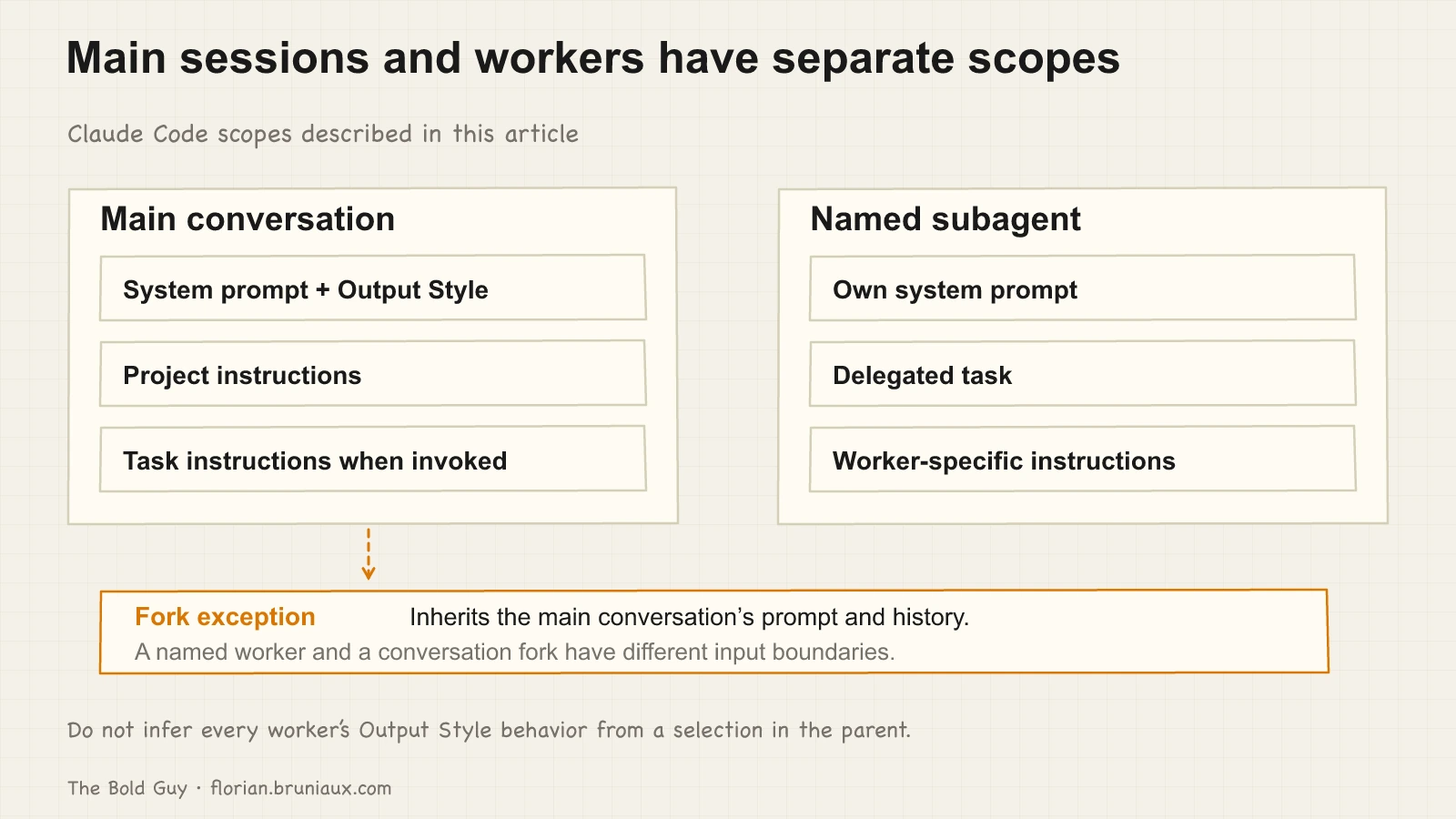
Output Style, CLAUDE.md, skill, and subagent have separate scopes
The choice becomes simpler when each mechanism has one job:
| Mechanism | Prompt position | Persistence | Correct use |
|---|---|---|---|
| Output Style | Modifies the main system prompt | Every main-conversation response while selected | Response format, voice, density, or a non-coding role |
CLAUDE.md | Project context after the system prompt | Loaded according to Claude Code’s memory hierarchy | Project facts, commands, conventions, and working boundaries |
| Skill | Task instructions | Loaded when invoked or selected | A reusable procedure, domain method, or behavior with its own checks |
--append-system-prompt | Added for one invocation | Current process | Temporary instructions for a scripted or one-off run |
| Subagent | Own system prompt, tools, and model | One delegated role or a session selected with --agent | Isolated work with explicit context and permissions |
The distinction matters for context engineering. A response preference used in every repository belongs in a user Output Style. A repository-specific test command belongs in project CLAUDE.md.
A 17-case response-control workflow belongs in the Flow Lean skill. A review worker that needs Flow Lean must preload it or invoke it inside that worker.
Anthropic states that Output Styles apply to the main conversation and to a fork, which inherits the parent’s whole conversation and system prompt. Any other subagent runs its own system prompt, so the style does not change how it responds.
The subagent documentation also provides a skills field for definitions that must preload complete skill bodies.
This is the boundary a router cannot erase. A BM25 hint in the parent conversation can suggest Flow Lean to the parent. It does not establish that a separately prompted subagent loaded the skill.
Subagent definitions, delegation prompts, and their own invocation evidence remain responsible for that claim.
The local setup is a release, not a loose copy
My global configuration keeps the editable style outside Claude Code’s live directory.
A renderer places the reviewed bytes in an immutable release, then an installer projects that artifact into Claude’s native location and selects it in settings.
~/.config/ai-agents/src/claude-output-style.md
  -> ~/.config/ai-agents/releases/<release-id>/claude/output-styles/flow-lean.md
  -> ~/.claude/output-styles/flow-lean.md
  -> ~/.claude/settings.json: { "outputStyle": "Flow Lean" }
On September 9, 2026, the source, release artifact, and live style were all 1,427 bytes and shared the SHA-256 digest cd54ccd231482dacdd91a6c1cf1541a87f05e56b913f0fe500a90020ee484b98. The full Flow Lean skill was 11,252 bytes with a different digest.
Those byte counts describe this configuration snapshot. They are not a token benchmark or proof of lower total cost.
The size difference only establishes the design boundary: the permanent style carries communication defaults, while the larger task contract stays available through skill discovery.
The portable configuration architecture explains why canonical source, generated artifacts, live projections, and runtime proof remain separate states.
Select the style at the scope you intend
For a personal default across repositories, set the style in user settings:
{
  "outputStyle": "Flow Lean"
}
The exact value matters when frontmatter overrides the file name. This style is stored as flow-lean.md, but its frontmatter declares name: Flow Lean.
Anthropic documents that the file name becomes the style name only when name is absent. The setting therefore needs to match the declared name, including its casing.
I verified that boundary with Claude Code 2.1.266 in an isolated project where user hooks, plugins, and MCP servers were excluded. Two fresh Haiku print-mode runs using "outputStyle": "flow-lean" omitted the footer required by the style.
Changing only that value to "outputStyle": "Flow Lean" produced Skills used: flow-lean on the next fresh run.
This is runtime evidence for that client version, not a guarantee about every release.
That object belongs in ~/.claude/settings.json. Running /config and selecting a style writes the choice to .claude/settings.local.json for the current project.
According to Anthropic’s settings precedence, managed settings win first, followed by command-line settings, local project settings, shared project settings, and user settings.
A local project selection can therefore override the personal global value. When the picker shows an unexpected style, inspect /status to see which setting sources loaded, then check the higher-precedence local and project files.
The Config tab shows the resolved selection, not which file supplied that individual key.
When I recorded this setup on Claude Code 2.1.266, the documentation pages disagreed about when a style switch took effect.
On September 15, 2026, the Output Styles documentation explicitly distinguishes switching an existing style from editing its file: a selection change applies on the next message from v2.1.251 onward; the terminal reads style files at startup, so creating or editing a file requires restarting the client.
The prompt-caching reference explains the cache effect of changing the system-prompt prefix.
The operational rule is narrower than either general statement: record the client version, switch before the first message when possible, and use a new session after editing the style file when you need unambiguous evidence about the loaded bytes.
A selected style is not behavioral proof
The screenshot establishes that /config displayed flow-lean as the selected Output Style. That was weaker evidence than it looked.
Matching hashes established that the expected file reached the native directory, but fresh-session canaries still ignored the style until the configured value matched its declared name exactly.
Use separate checks:
| Claim | Evidence |
|---|---|
| Present | ~/.claude/output-styles/flow-lean.md exists |
| Installed | Its digest matches the selected immutable release |
| Selected | Resolved settings show outputStyle: Flow Lean, matching the style’s declared name |
| Loaded | A client trace or instrumented prompt capture correlates the session system prompt with the reviewed style; otherwise UNKNOWN |
| Effective | A correlated prompt produces the required answer shape without losing required proof or safety |
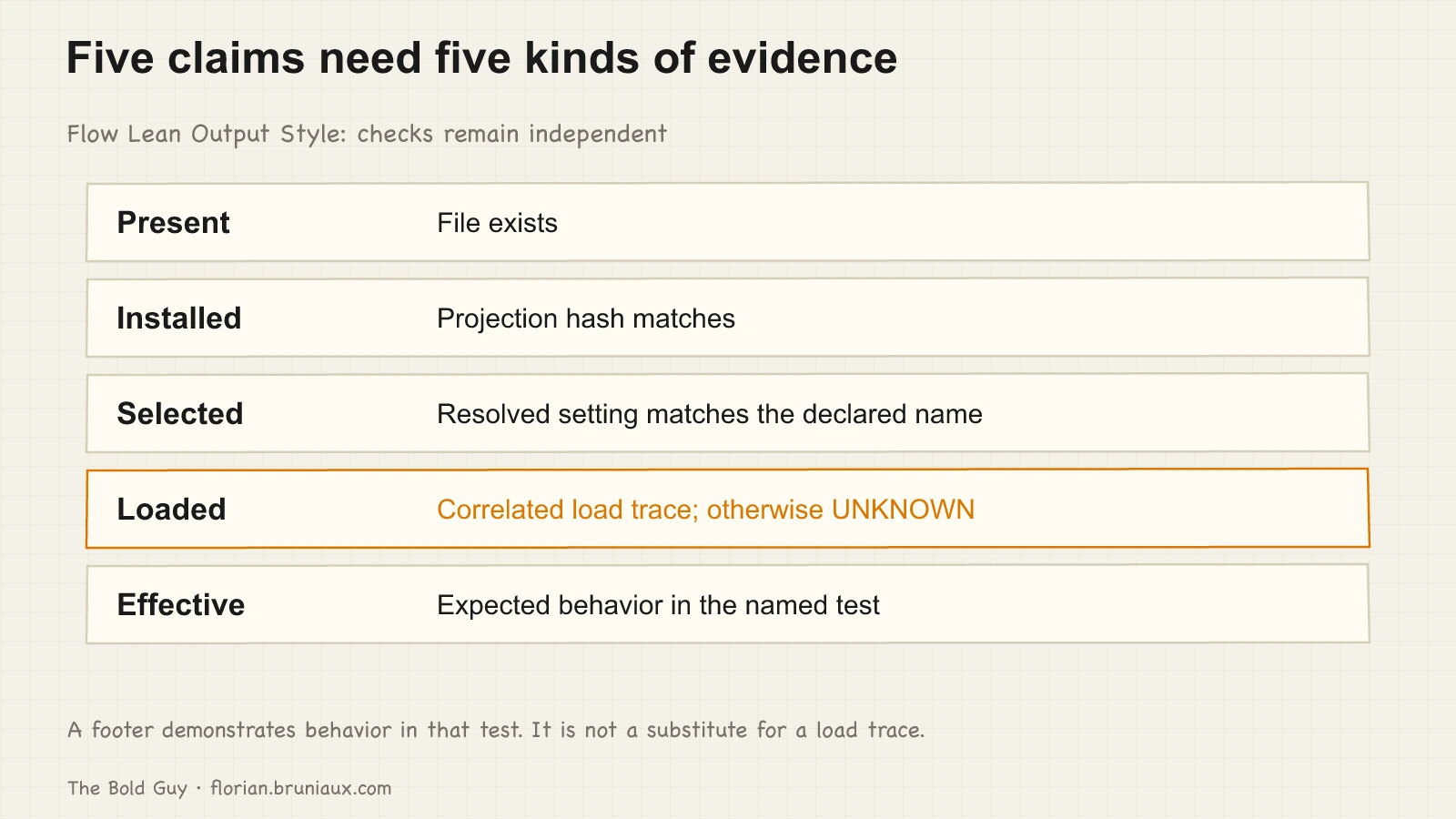
A Skills used: flow-lean footer is useful behavioral evidence generated by the model. It is not native invocation telemetry.
A session transcript, a native Skill call, or instrumented loader evidence can establish invocation. A behavior canary establishes only the prompt and surface it tested.
The same isolated run also exposed the subagent boundary. Its stream trace reported output_style: Flow Lean for the parent and the parent emitted the footer. A named subagent’s returned text did not.
The subagent rejected its deliberately synthetic task for an unrelated security reason, so this run supports scope separation only. It does not prove successful task execution or correct skill routing inside the worker.
For Flow Lean, use a factual prompt with one exact command, then a recommendation and a destructive-action prompt.
The first checks density. The second checks that the verdict survives compression. The third checks that compression suspends.
Run equivalent cases for any subagent whose behavior you plan to claim.
Keep the full skill available
The compact style should not absorb Flow Lean’s complete evaluation contract. Modes, recap controls, stable handles, reviewer provenance, fact gates, and host-specific invocation remain in SKILL.md.
That separation also keeps other response styles possible without uninstalling the skill.
Use the Output Style for the main conversation’s default form. Invoke the skill when the task needs its full behavior. Preload the skill in subagents that must follow it. Audit each surface with evidence that matches the claim.
YSNK
(You should now know)
- Output Styles modify the main conversation’s system prompt, while CLAUDE.md carries project context
keep-coding-instructions: truepreserves Claude Code’s built-in software-engineering guidance- A configured style name must match an explicit frontmatter
name, including casing - A compact style can carry defaults while the complete Flow Lean workflow remains a skill
- Named subagents do not inherit the main Output Style, so each surface needs its own behavioral evidence
Go Further in the Claude Code Guide
Practical resources selected to help you take the next step.
Open-source galaxy