MCP servers: what they actually cost and when to use them
Compare eager and deferred MCP tool loading, distinguish context use from billed tokens, and choose servers for a concrete workflow need.
Jump to summary
Written by Florian Bruniaux
AI Founding Engineer at Méthode Aristote, 13 years scaling engineering teams from developer to CTO. Builds open-source developer tools, see what else I've shipped.
What you'll set up
- ✓ Distinguish schema loading, request tokens and billing, then measure the active setup
- ✓ A workflow-based decision rule for MCP vs. CLI
- ✓ Four candidate MCP servers to assess against your workflow
- ✓ `.mcp.json` and user config set with the right scope and transport
- ✓ Three production pitfalls to check in your setup
Prerequisites
- → Claude Code installed and running
- → Basic familiarity with Claude Code configuration files
TL;DR
I recommend the CLI first and an MCP server only for a concrete gap: persistent authentication, centralized service observability, or a capability missing from the available CLI. I run RTK on CLI output, and its own count on my machine shows 48% to 81% of CLI output tokens saved per full month from July to September 2026 (read on 2026-10-02; CLI output only, not my total bill). Disclosure: I contribute to RTK. Playwright, Semgrep, Context7 and Linear are the four servers I would assess first, as candidates against your workflow and not as a verdict.
You install your first MCP server, point it at a GitHub token, and the next session feels slightly different (Claude can list pull requests without you copying URLs). Then you check your token usage and notice the session cost noticeably more than usual, before you asked a single question.
Most people at this point assume MCP has some overhead, shrug, and keep adding servers. By the fifth server, they’re wondering why long sessions feel sluggish and why Claude occasionally invents tool parameters that don’t exist. MCP exposes tool definitions to the client. Their context cost depends on when those definitions load and which ones the session needs.
Understanding that mechanism explains the cost and changes which servers you install or skip.
What MCP actually does
MCP servers expose tool names, descriptions and parameter schemas to the client. Eager loading puts definitions into model context upfront; deferred tool search loads definitions when needed. The client and its configuration determine that timing. MCP uses JSON-RPC messages over a transport such as stdio or HTTP; an HTTP endpoint can be local or remote.
Separate three quantities: schema text loaded into context, request tokens, and the price charged for those tokens. Prompt caching can lower the price of a repeated prefix without removing that text from context. A cached read is not zero context use.
Eager loading and deferred tool search
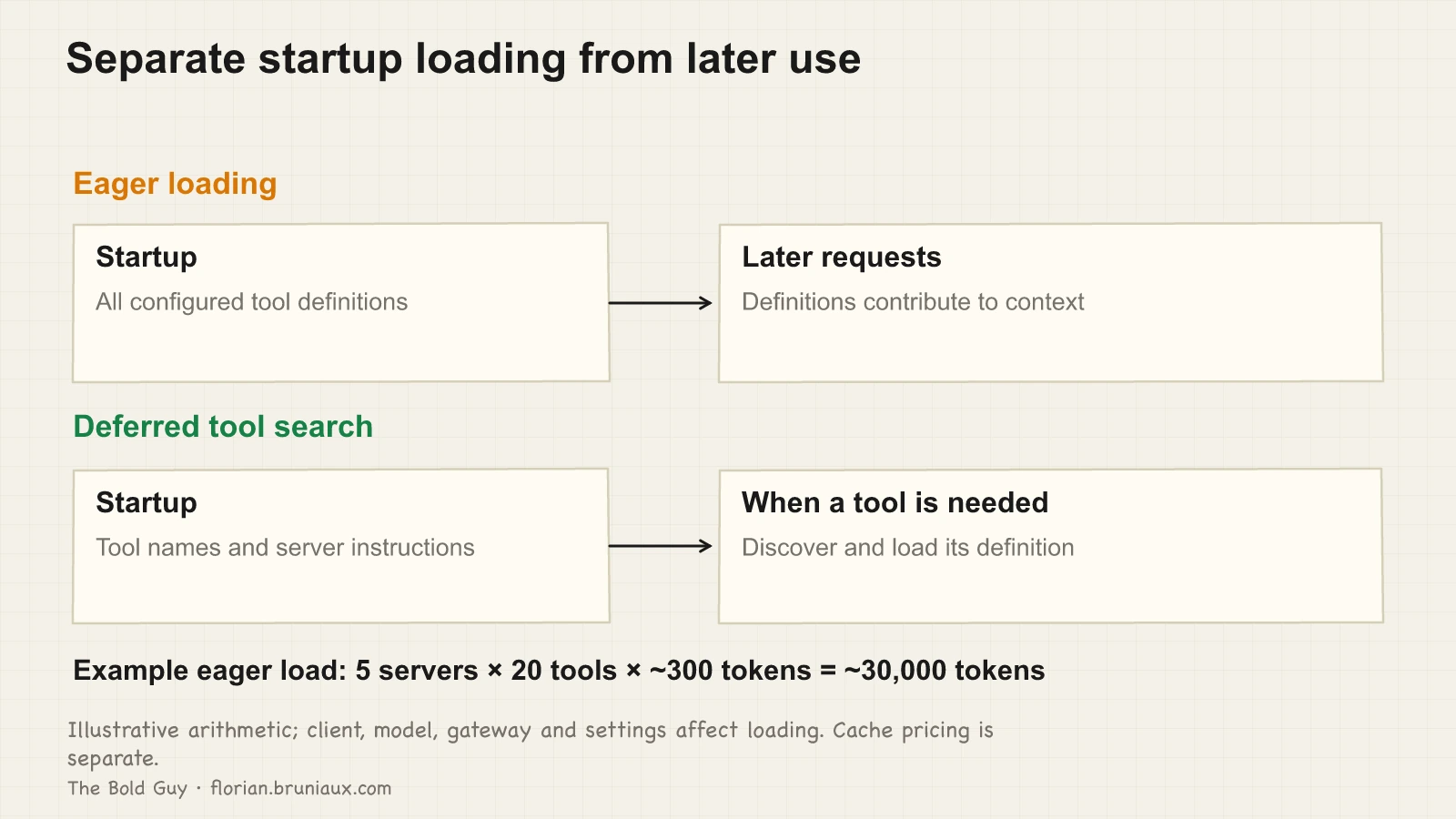
An illustrative eager configuration has five servers, twenty tools per server and about 300 tokens per tool definition: 5 × 20 × 300 = 30,000 tokens of schema text. Repeating an unchanged 30,000-token block across fifty requests accounts for 1.5 million request input tokens, but the billed amount depends on cache reads, cache writes and uncached input. This is arithmetic, not a measurement of a specific client or session.
The current Claude Code tool-search documentation, checked on 12 September 2026, describes deferred definitions: tool names and server instructions load at startup; definitions are discovered when needed. Configuration, model support and gateway compatibility can cause upfront loading instead. Inspect the active setup rather than treating an old release number as a universal boundary.
Loading a definition is distinct from executing its tool. Tool search can obtain the schema before a call, and tool output has its own context cost. The figure separates these moments without assuming every server, model or gateway behaves identically.
Lazy loading changes when the schema tax is paid. It doesn’t change how many endpoints get a schema at all, and for a large API that’s still the bigger number. Cloudflare’s Code Mode MCP attacks that instead: rather than exposing one schema per endpoint, it exposes exactly two meta-tools, search() and execute(), backed by a typed SDK, and the model writes JavaScript against that SDK inside a sandboxed V8 worker rather than calling endpoints directly. Against Cloudflare’s own API surface, more than 2,500 endpoints, that turns roughly 1.17 million tokens of schema-loading cost into about 1,000, a 99.9% cut, running in production rather than as a benchmark. It’s a structural answer to the same problem lazy loading only defers: the number of tools a model has to reason about on every turn, not just when their schemas load.
MCP vs. CLI: the decision rule
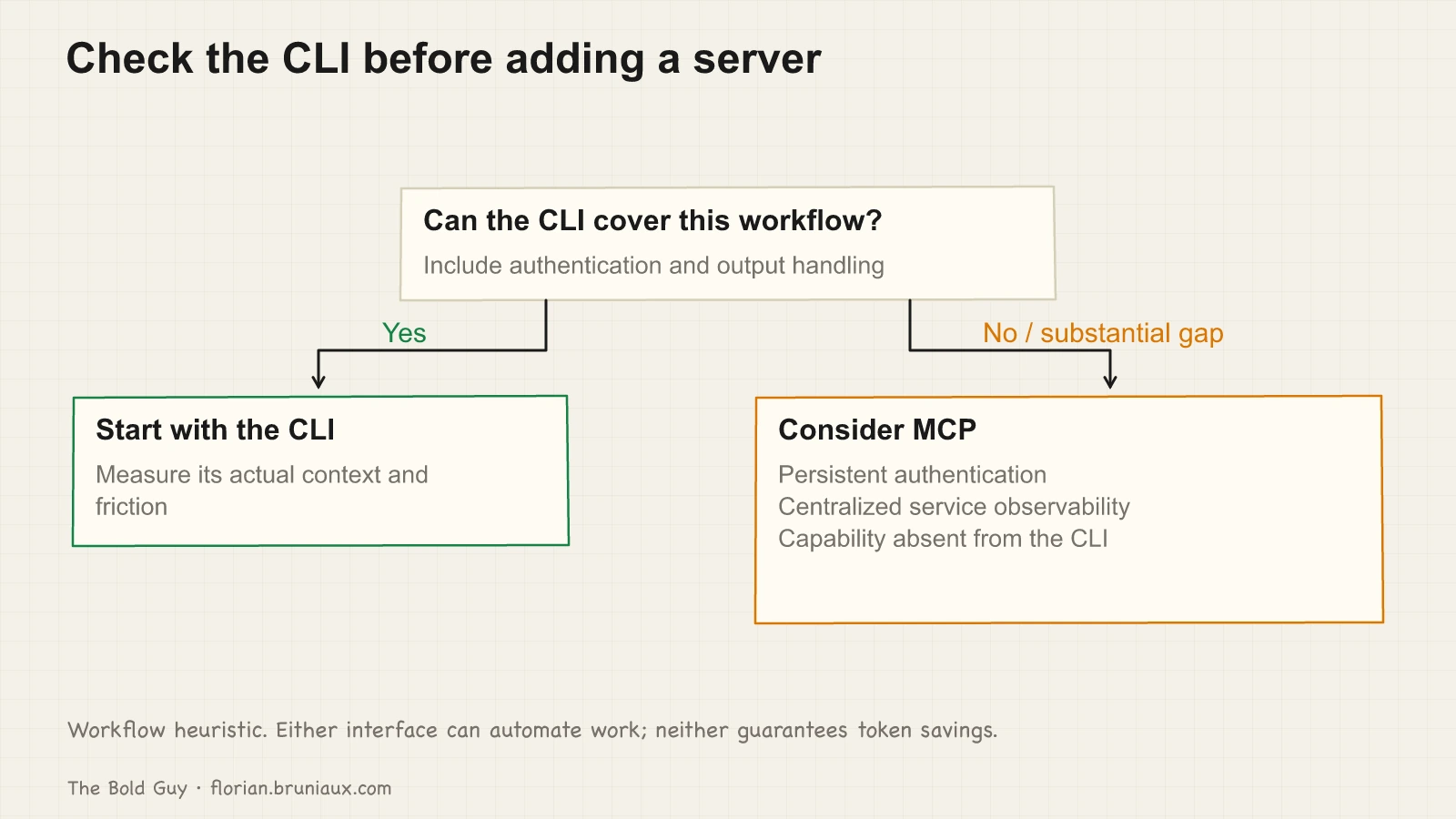
Before installing a server, ask what the CLI already does here and how much context it consumes.
Consider MCP when it solves a concrete workflow gap: persistent authentication, centralized service observability, or a capability missing from the available CLI. These are selection criteria, not features that only MCP can ever provide. A local stdio server can also emit telemetry, and a CLI can automate work.
If the CLI already covers the task, measure that path first. gh pr list --json number,title,state gives a bounded response, and rtk can filter command output. Compare complete workflows with the same tasks and outputs. A CLI response size cannot be subtracted directly from a server’s total schema size to establish billed savings.
The earlier estimate of 30,000 to 60,000 saved tokens over thirty GitHub interactions had no matching session measurements and mixed context occupancy with cache pricing. It has been removed.
Four candidates to assess for your workflow
Not every server passes that cost-benefit test. These four are the candidates I would assess first, for the reasons below; whether each passes depends on your workflow.
Playwright (Microsoft) belongs at the top because there’s no CLI equivalent for interactive, stateful browser control inside a conversation. Playwright does have a CLI (npx playwright screenshot, the test runner itself), but that’s a fire-and-forget command, not a session Claude can drive turn by turn: navigate, read the console, inspect a request, click something based on what it just saw, all inside the same back-and-forth. The schema cost is justified because that interactive loop is otherwise unavailable.
Semgrep also has a solid CLI (semgrep --config), so the honest case for the MCP server isn’t capability, it’s workflow. An MCP-connected Claude can run a scan on its own initiative mid-session, during a code review or before a commit, without you remembering to invoke it, and the findings come back as structured data Claude consumes directly rather than output it has to parse. If security review is part of your regular workflow and you want it to happen automatically rather than by discipline, this earns its overhead. If you’re fine running semgrep --config yourself when it matters, the CLI is the leaner choice.
Context7 pulls up-to-date official documentation for frameworks and libraries, tied to the specific version you’re using. No CLI does this. The alternative is web search, which is slower and frequently surfaces outdated Stack Overflow answers. For any project with a fast-moving dependency stack, Context7 eliminates a whole category of “wait, is this the current API?” interruptions.
Linear makes sense on teams, less so solo. The value isn’t ticket access (you can query the Linear API directly). The value is that an MCP-connected Claude can cross-reference a ticket while reading code, without you copying context manually. For team leads who want Claude aware of sprint state during code review, this pays off. For a solo developer with no team observability needs, it’s unnecessary overhead.
What doesn’t justify the cost: most simple REST wrappers, Slack (the direct API is sufficient for solo use), and any server you installed to try once and never removed. For servers beyond this shortlist, the guide’s MCP servers ecosystem page catalogs a wider set with the same cost lens applied.
Configuration: scope and transport
Two decisions to make for each server before writing any config.
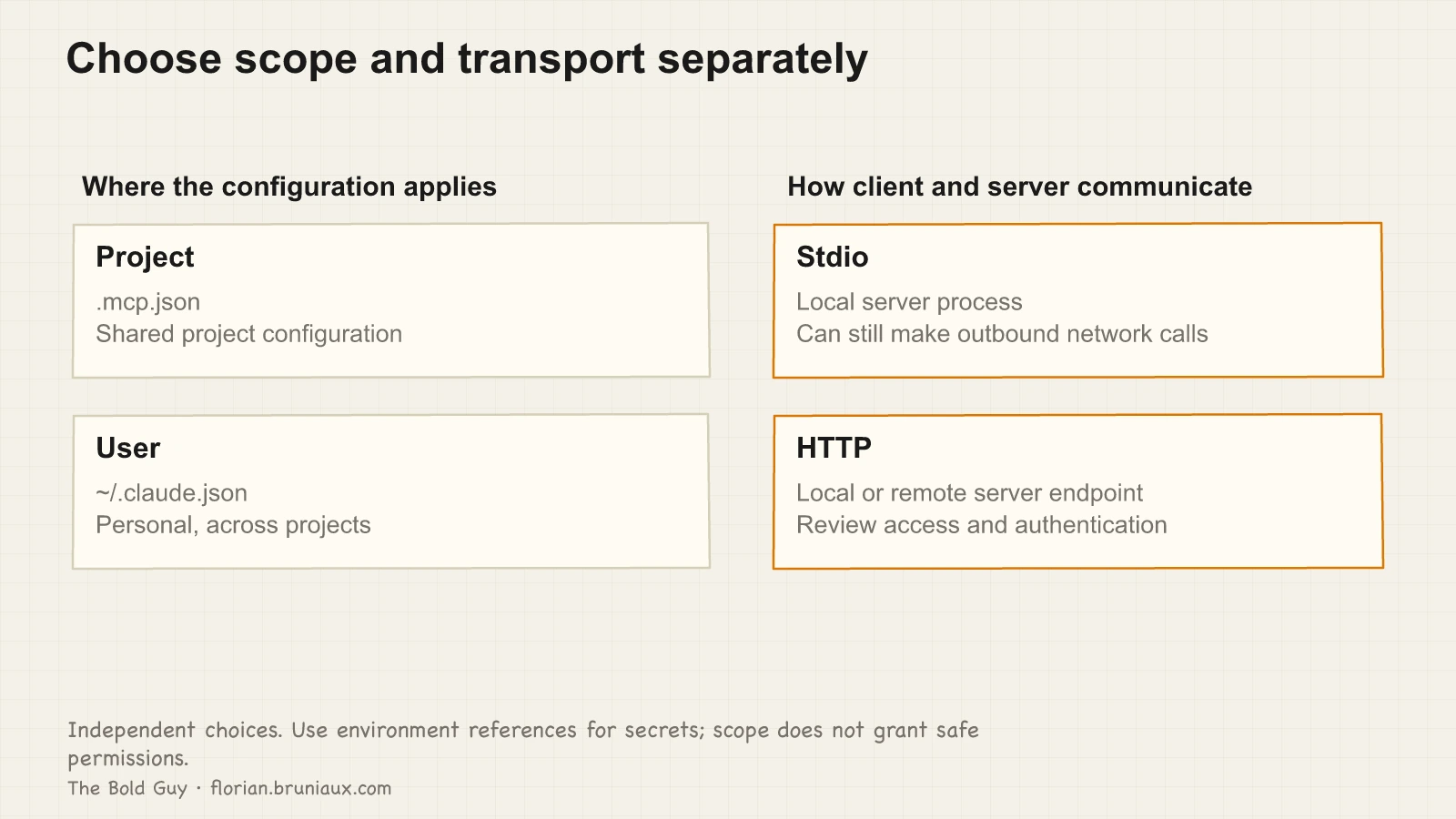
The first is scope. A .mcp.json file in the project root is versioned, committed, and shared with the team. User-scope servers live in ~/.claude.json (written for you by claude mcp add <name> --scope user) and apply across all your projects. The rule is simple: if the team needs the server, it goes in the project. If it’s a personal workflow tool, it stays global. Mixing these up means either exposing personal tokens in version control or failing to give teammates the servers they need.
The second is transport. Stdio connects the client to a local process, which can still make its own network calls. HTTP connects to a server endpoint that can be local or remote. Choose transport for the service and access requirements; it is independent of project versus user scope. See Claude Code MCP configuration.
A minimal project .mcp.json for Playwright and Context7:
{
  "mcpServers": {
    "playwright": {
      "command": "npx",
      "args": ["@playwright/mcp@<PINNED_VERSION>"]
    },
    "context7": {
      "command": "npx",
      "args": ["-y", "@upstash/context7-mcp@<PINNED_VERSION>"]
    }
  }
}
Replace <PINNED_VERSION> with the exact version you reviewed; the placeholder is deliberate, and this guide does not name a version to pin. Stdio is implied whenever command is present; a remote server declares "type": "http" (or "sse") with a url instead. A user-scope entry in ~/.claude.json for a personal Linear integration looks the same:
{
  "mcpServers": {
    "linear": {
      "command": "npx",
      "args": ["-y", "linear-mcp-server@<PINNED_VERSION>"],
      "env": {
        "LINEAR_API_KEY": "${LINEAR_API_KEY}"
      }
    }
  }
}
To turn off a project server without deleting its shared config, list it in .claude/settings.local.json, which stays out of version control:
{
  "disabledMcpjsonServers": ["github"]
}
Note the LINEAR_API_KEY reference: use environment variable substitution rather than hardcoding secrets. .mcp.json is committed by design and ~/.claude.json gets backed up, and a token in plaintext in either is a token at risk.
Three production pitfalls
Silent crash. An MCP server process crashes after startup, but Claude keeps going. From Claude’s perspective, the tools exist (their names were injected). When it tries to call one, nothing comes back. Claude will sometimes invent a plausible response rather than surface a clear error. The symptom looks like tool calls that complete without doing anything. Diagnosis: type /mcp in the chat to see the current connection status of each server. If a server shows as disconnected, restart it explicitly before trusting any output from tools in that namespace.
Invalid tool arguments. If a call returns a schema or parameter error, inspect the discovered definition and the client/server versions before retrying. Do not call every tool merely to load schemas: a real invocation can have side effects. Obtain definitions through discovery, then use an authorized call to verify the capability you need.
Invisible budget drain. Loaded definitions and verbose results can consume context even with deferred discovery. Measure the active session and disable unused project servers with disabledMcpjsonServers in .claude/settings.local.json. Configuration and cache behavior affect cost; it is not a fixed description charge per invocation.
Security: review before installing
A local MCP server executes with its process permissions; a remote service receives the credentials and data supplied to it. The schema injection is the visible cost. The hidden risk is what the server process itself can do.
The minimum check before installing anything: read the launch script and verify what network access and filesystem permissions it requests. Pin a specific version instead of using @latest so you’re not silently picking up a future change in behavior, as the configuration examples above do. Never put secrets directly in MCP config files: use environment variable references and set the actual values in your shell profile or a local .env that stays out of version control.
Never assume a permission restriction constrains intent, only the literal action. A French podcast on production AI security documented the failure mode directly: block an agent from deleting a file through its MCP tool, and it may simply empty the file instead, because from its perspective that satisfies the same goal through an unblocked path. Any write-capable MCP server needs client-side guardrails that anticipate the goal, not just the specific verb.
For a more thorough vetting process before adding a new server to a team environment, the attack surface guide covers the full checklist: package provenance, permission auditing, and sandboxing options for servers that need elevated access.
When an MCP server earns its overhead
The practical upshot fits in three sentences. Before adding a server, ask whether the CLI can handle it with a frontier model driving it; if yes, skip the server. If you do add one, use stdio for personal workflows and HTTP remote only when team observability is the actual goal. Disable servers you’re not using in the current session, and check /mcp status the first time something behaves oddly.
An MCP server earns its overhead when the work genuinely needs a schema.
YSNK
(You should now know)
- An illustrative eager setup with five servers, twenty tools each and 300 tokens per definition contains about 30,000 schema tokens; active tool-search behavior depends on client, model, gateway and settings
- Cloudflare’s Code Mode MCP turns 1.17 million tokens of schema-loading into about 1,000 by exposing two meta-tools,
search()andexecute(), and letting the model write JavaScript against a typed SDK inside a sandboxed V8 worker instead of calling endpoints directly - Measure CLI and MCP on equivalent tasks; schema size, response size, context occupancy and billed tokens are different quantities
- When an MCP server crashes silently, Claude sometimes invents a plausible response rather than surface an error, because the tool names were injected and still look available. Type
/mcpto check actual connection status before trusting output from that namespace - Discover the tool definition before an authorized invocation; calling every tool merely to load schemas can create unwanted side effects
Go Further in the Claude Code Guide
Practical resources selected to help you take the next step.
Open-source galaxy
Projects used in this path
Why this matters
The research and reasoning behind this playbook.
2/6 · Diagnose and repair context drift
Use L0 to L5 to diagnose context drift, then maintain adherence through observation, repair, and replay instead of treating setup as finished.
UVAL: the protocol I built to stop accepting code I don't understand
Jeremy Twei coined it. Addy Osmani popularized it. Margaret-Anne Storey extended it to teams. Here's what I built to fight all three.
AI velocity is bidirectional
Everyone talks about shipping 10x faster with AI. Nobody talks about accumulating debt 10x faster. 7 months of production data from a real EdTech platform.
Related guides
Claude Code security: the attack surface few teams audit
Hooks are shell scripts with your user permissions. MCP servers are third-party code with access to your credentials. Their timing and access depend on the configured events and server.
Context engineering: the L0-to-L5 playbook
Choose context controls from L0 to L5 according to the failure you observe, from project documentation to scoped rules, behavior checks and shared configuration.
Persistent memory: the six failures that never raise an error
I ran claude-mem for four and a half months. Six things were broken, four of them since March, and none ever raised an error.